01
Set it up in NoBonk
Start in the camera view. Test what your phone detects, adjust sensitivity, and choose your sound, vibration or voice cues in a safe space.
 NoBonk.Get NoBonk
 BY KRISHAV · HIGH SCHOOL FRESHMAN · LIVE ON GOOGLE PLAY
NoBonk is a high school freshman’s effort to help reduce the risks of distracted walking.
Start NoBonk, then switch apps. On Android, its rear-camera AI can keep detecting nearby obstacles and bring alerts onto your screen.
An extra nudge to look up. Never a replacement for watching where you’re going.
THE FULL TOUR · WITH VOICE & MUSIC
See how to set up NoBonk, choose People or Everything, use background scanning, return to the app and stop. Follow the real Pixel 9a screens, one step at a time.
Watch the 3-minute guide →Android 1.0.23 preview · Two first-run examples use labelled emulator screens. Controls can vary by version. NoBonk can miss hazards. Always look up.
1st place STEM4All 2026
IEEE Award STEM4All 2026
3rd in category ACSEF 2026
01 / The idea
Krishav saw students at school bump into each other—or into walls—while looking at their phones. He wondered: could the phone help people notice what was in front of them, even when they were using another app? That is why Android background detection is at the heart of NoBonk.
Start in the camera view. Test what your phone detects, adjust sensitivity, and choose your sound, vibration or voice cues in a safe space.
On Android, allow display over other apps for NoBonk only, then choose Run in background. You do not need to give each other app permission. Keep the rear camera uncovered and pointed ahead.
Alerts can appear above other apps. Use Open NoBonk to return to the controls. Detection can miss hazards, especially in poor light or when the camera points away.
A REAL PROBLEM. A LITTLE WAY TO HELP.
Krishav saw students at school bump into each other and walls while looking at their phones. Research on distracted walking shows this is a wider, real-world problem too. NoBonk is his small attempt to help: a nudge to look up when your attention is on your screen.
In a study of 1,102 pedestrians at 20 selected high-risk Seattle intersections in 2012, texting was associated with an extra 1.87 seconds to cross the average intersection, compared with undistracted walking.
Thompson, Rivara, Ayyagari & Ebel · Injury Prevention, 2013A 2020 meta-analysis combined 14 experimental studies. Texting reduced looking left and right before or during street crossing. Phone conversations and texting also increased hits and close calls in the studied settings.
Simmons, Caird, Ta, Sterzer & Hagel · Injury Prevention, 2020A little help with something that matters. These street-crossing studies help explain why distracted walking deserves attention. Thank you to the researchers credited above for helping us understand the problem. NoBonk is Krishav’s contribution: an experimental extra cue to notice what’s nearby. Always look up and stay aware of your surroundings.
THE PERSON BEHIND THE PROJECT
From an idea at school to an app on a phone. Hear Krishav explain why he started, then watch him try what he built.
THE APP, IN HIS OWN WORDS
A hands-on Android walkthrough: settings, cues and a demonstration of alerts while another app is open.
Recorded September 2026. Background demonstration starts around 1:14. This recording shows a test build; controls can change.
FROM THE PROJECT ARCHIVE
Krishav explains the school-hallway problem, the ideas he considered, and why he wanted the phone itself to help.
Original project presentation, February 2026. It describes early goals and stronger distance/collision claims, not verified guarantees for today’s app. Distance is approximate; alerts can miss hazards.
YouTube loads only after you choose to play. Its privacy policies then apply. Only one of these videos plays here at a time.
FOREGROUND / YOUR SETUP & TEST SPACE
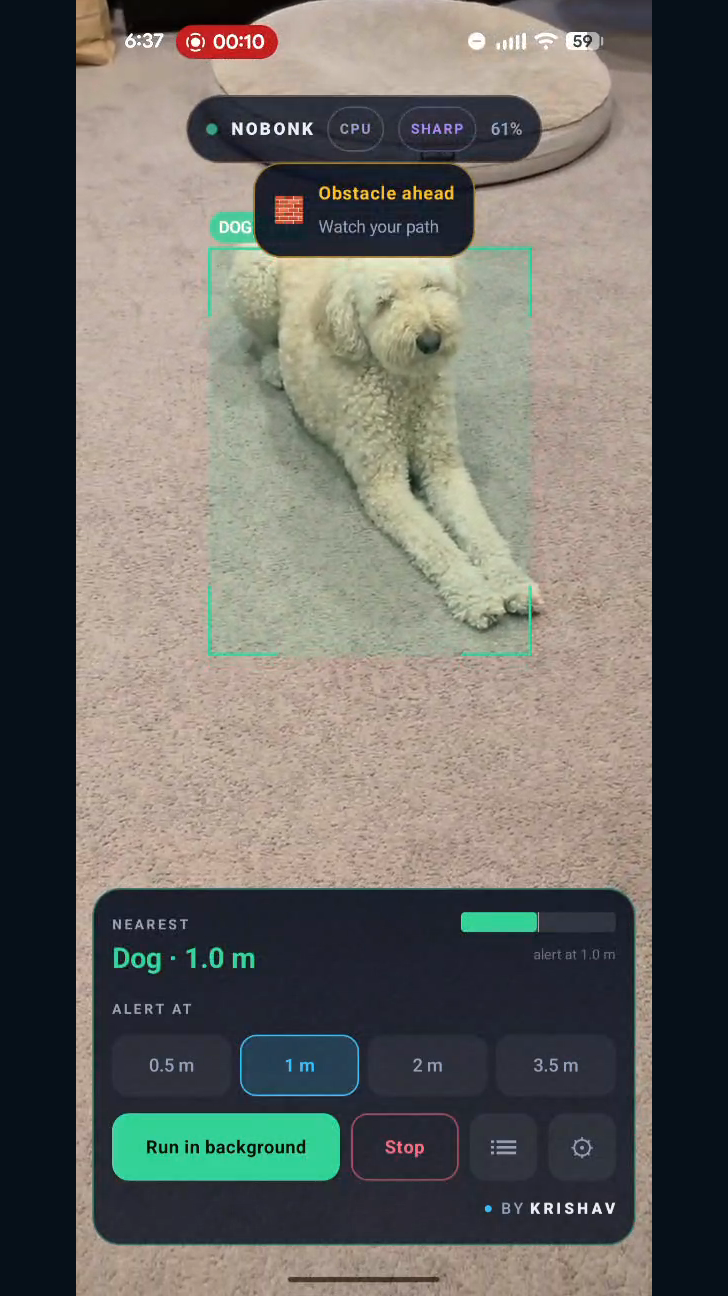
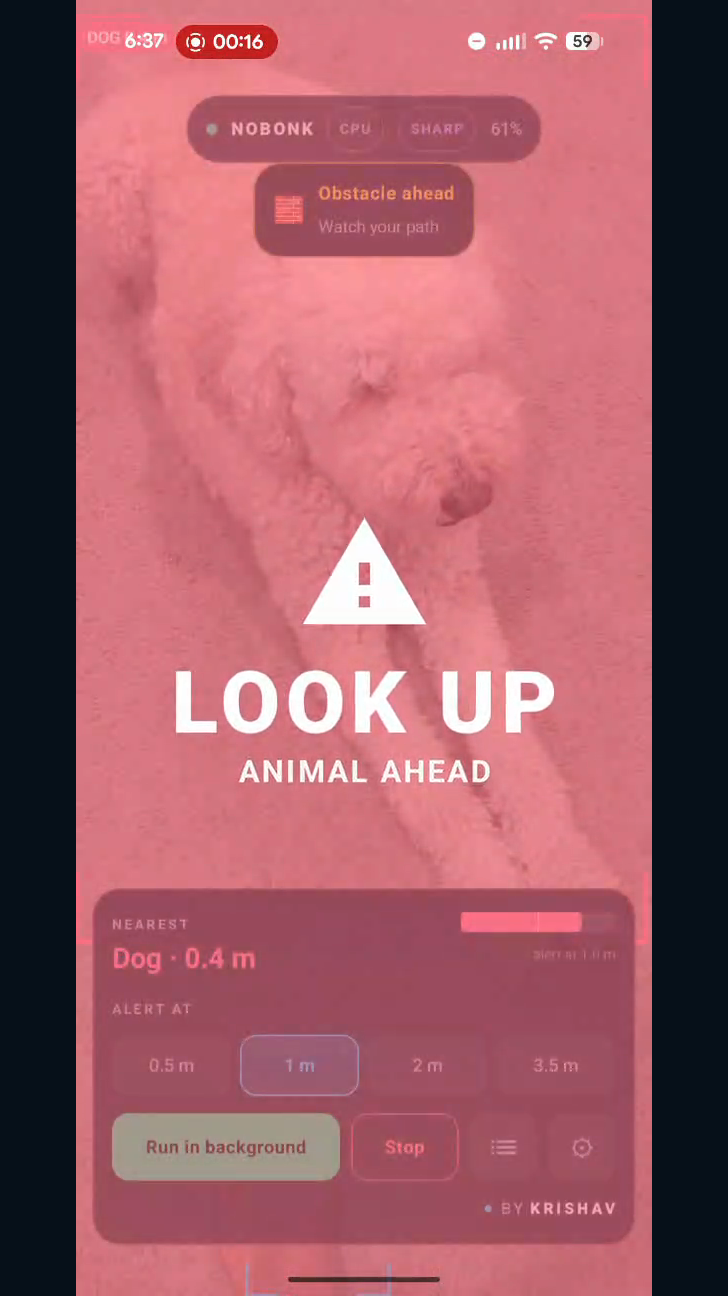
The Android camera view lets you see what your phone detects and tune the cues before switching to background mode. These real Pixel 9a frames show a dog detection and the resulting alert.
These are frames from the actual app, with plain side margins. The distance shown is an estimate. NoBonk can miss or misidentify hazards.
ONE IDEA. TWO DIFFERENT PLATFORMS.
Use the foreground camera view to test detections and tweak your settings. Background mode is the main Android experience: user-started camera detection and alerts while another app is open.
Browse & scan keeps a compact camera view above a website inside NoBonk. Read a page, try supported inline video, or switch to Read / write for a message you choose to paste or write, with the camera still in view.
Being tested on real iPhones. Public App Store and TestFlight availability are still to come.
iPHONE / A DIFFERENT WAY TO LOOK UP
iPhone works differently from Android. So we’re building an experience around a camera you can see, with useful space beneath it. This is a development preview, not a public release.
NOBONK BROWSE & SCANCompatible web content lives inside NoBonk, below the camera.
Layout illustration · not a camera screenshot
Choose Instagram web or YouTube, or enter a secure website address. Compatible pages and inline video sit below the camera. Website features and sign-in depend on the service; Instagram login and messaging are not yet verified in this preview. Full-screen video or switching to another app pauses scanning.
People mode uses Apple Vision. Fast Objects adds eight classes: people, bicycles, cars, motorcycles, buses, trucks, cats and dogs. Both process camera frames on your phone. Neither detects every hazard, and the iPhone preview does not measure distance. Clear status labels distinguish preparation, recent detections and delayed analysis. Old results fade from view while a slower phone keeps processing.
Choose Read / write. Read mode displays text you explicitly paste in a scrollable view without the keyboard; Write mode lets you compose beneath the camera. Paste adds to your existing text. When you’re ready, stop somewhere safe and choose Pause & share. Apple’s share sheet offers available apps, which may include Messages or WhatsApp. On a configured iPhone, the larger layout also offers a direct Messages composer.
You choose who receives it and confirm sending. Sharing pauses the scan; return and tap Start to resume. Your draft stays if you cancel. NoBonk does not save or sync drafts, and cannot read native Messages, WhatsApp or Instagram inboxes.
Adjust cue sensitivity, Sound and Haptics in Set up. Switch between detection modes after stopping. Use Browse for websites or Read / write for selected text. The camera and Start/Stop control stay separate from the content below; the compact draft layout leaves room for the keyboard.
Open NoBonk through Siri or a Shortcut. Supported iPhones can also use an Action button, Control Center or Lock Screen control. These open the app; they do not bypass the reminder or secretly start scanning.
Camera frames are processed in memory, never saved or uploaded by NoBonk. Websites you choose connect to the internet and follow their own privacy policies. The browsing pane uses temporary storage and denies website camera, microphone and motion access.
Keep NoBonk open and the rear camera uncovered. Leaving the app, locking the phone, an interruption or full-screen web media stops scanning. Browsing is not native iPhone split-screen, and Android-style background camera scanning is not included. NoBonk can miss or mislabel objects, especially in poor light. Stay aware of your surroundings.
You can try Instagram’s website inside Browse; sign-in and feature compatibility vary. Opening the native Instagram or WhatsApp app pauses NoBonk. WhatsApp Web is not a supported mobile mode here. Use Read / write to paste selected text or compose beside the camera, then switch to Write and share through an available installed app. It is not a live inbox.
The preview is currently installed directly on development test phones. There is no public iPhone download or TestFlight link yet. The Google Play download link is for Android only. Follow the project for the public iPhone release.
Fast is the model’s name. The preview prefers Core ML where available and can fall back to the CPU. Work and temperature affect analysis pace. We are testing newer and older device behavior; we don’t claim that a processor label guarantees better performance or detection.
02 / Inside the decision
Make a person’s detection box grow. Add an approach signal. Watch the alert change using Android’s actual person-alert thresholds.
The tracker sees a closing object.
On-bearing, estimated contact ≤ 1.5 s.
At 28% frame height and above, the person ladder reaches LOW.
Educational simulation of Android’s person alert policy at the 2 m sensitivity preset. No camera access. This is not a distance measurement; the full app also filters detections and applies tracking and alert timing.
Read the actual logic03 / Out of the lab
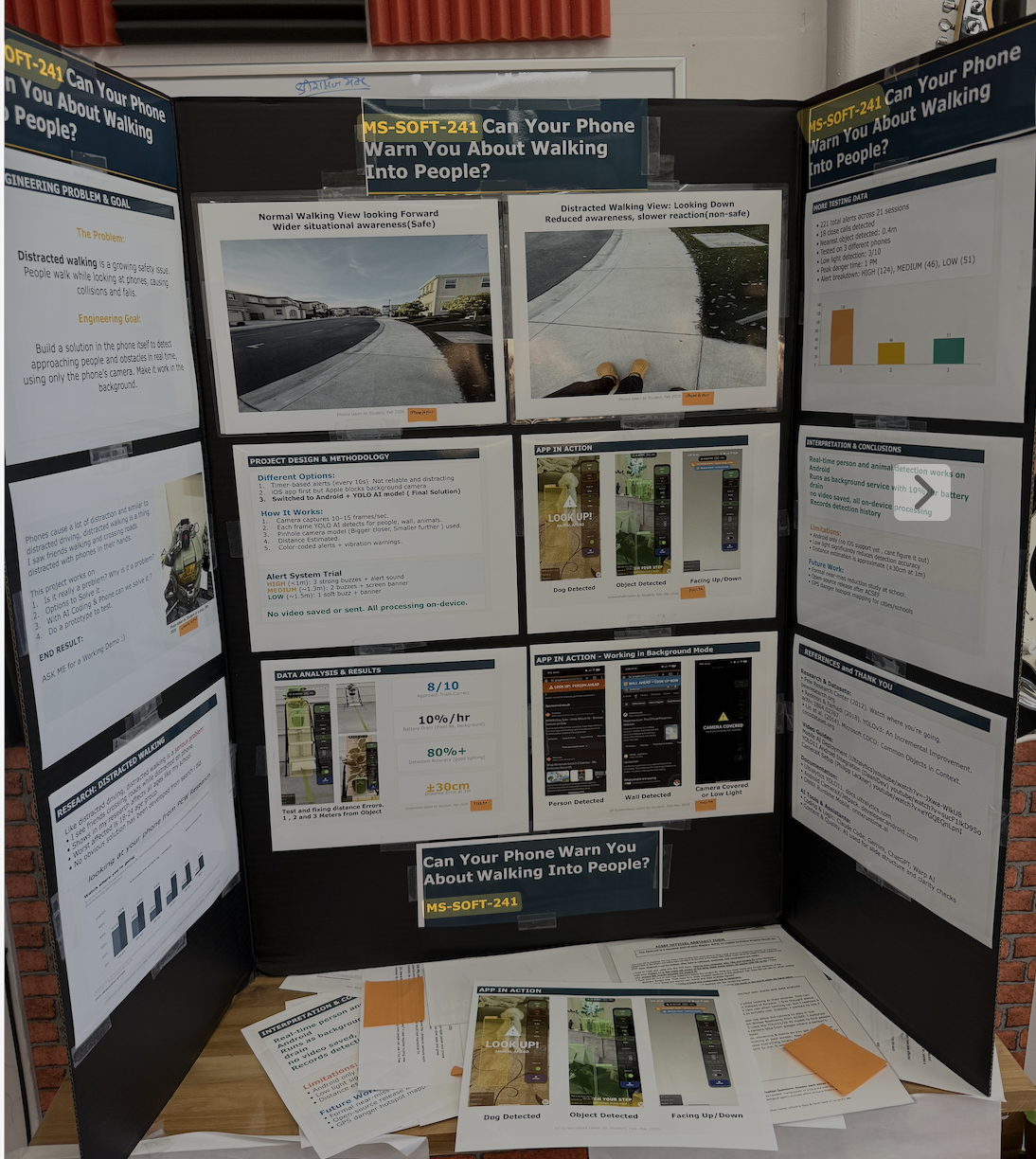
Early results reported by the project on a Pixel 9a. Promising signals, with plenty still to learn. These are prototype observations, not independent validation.
Reported detection accuracy under good lighting.
Reported approach-detection trial results.
Distance estimates depend on angle and scene.
The project reports 3/10 detection in low light and about 10% battery drain per hour in background mode. Older phones can lag. NoBonk is a student-built prototype that can miss hazards. Keep looking up.
 Concept illustration / not an app screenshot
04 / On your phone. By design.
Processed in memory, then discarded. No saved photos or video. The Android app has no Internet permission. The iPhone preview also keeps camera processing local; websites opened in its browsing pane use the internet.
On Android, detection events stay in private storage on your phone and can be cleared. Approximate location is optional and off by default. The iPhone preview does not include this history feature.
IN DEVELOPMENT · OPTIONAL ANDROID FEATURE
We’re changing the experimental walking option to ask once instead of starting the camera automatically. It will be optional and off by default. You stay in control of when scanning begins.
Upcoming update, still under test. The ask-first behavior is not yet available on Google Play. Until it arrives, start background scanning yourself and leave any older automatic walking option off if you do not want it to start a scan.
A STUDENT’S IDEA. YOUR CHANCE TO HELP.
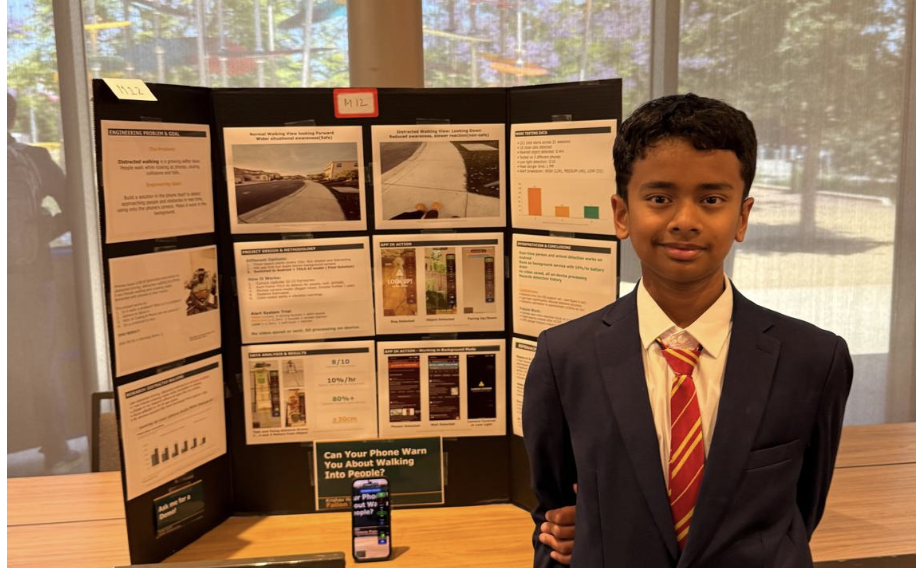
After seeing fellow students bump into people and walls while looking at their phones, Krishav wondered: could the phone give them a heads-up?
NoBonk grew from that question. On Android, it can scan in the background and alert while another app is open. It’s now free on Google Play. Try it on your phone and tell Krishav what works—and what needs work.
From a school-hallway idea to a public release. Download NoBonk directly from Google Play. No tester signup or group membership is needed.
Free · Android 10+ · Ages 13+ · iPhone development preview coming later.
Thank you, testers. Your time and feedback helped Krishav get here. Keep sharing what works and what needs work.
Start scanning yourself, then choose Run in background. The optional walking reminder is still in development.
Watch the step-by-step video Read the setup guideNoBonk can miss hazards or give false alerts. Always watch your surroundings.
DOWNLOAD. SET UP. LOOK UP.
You need Android 10 or newer, a rear camera, and a safe, well-lit space. NoBonk is now publicly available on Google Play.
Open NoBonk on Google Play and tap Install. You do not need to join a group or enroll in a test.
Read the safety reminder and choose sound, haptics or both. Allow the camera when prompted. Settings lets you adjust your preferences.
Stand still in a safe place. Keep the rear camera uncovered and pointed ahead. Compare the visible detections with the scene. People mode alerts for people; choose Everything to include supported objects.
Choose Run in background. Allow display over other apps for NoBonk only, then switch to your home screen. Use Open NoBonk to return. Use Stop to end scanning.
Check Google Play for updates. You can find the installed version in Settings. Watch the video guide for a tour of the controls.
Use Settings → Send feedback, or email support. Tell us what you expected, what happened, your phone model and app version. Leave personal details out of screenshots.
Email NoBonk supportKeep looking up. NoBonk can miss hazards and give false alerts. Do not test in traffic, while cycling or driving, or by approaching anything dangerous.
Choose People if you only want person alerts. Everything also considers supported objects. Adjust the alert-distance setting and choose your sound or vibration cues while standing still. Distances are estimates.
Android and some apps hide overlays on protected screens. Another camera app can interrupt scanning. If notifications are allowed, use the NoBonk notification to return or Stop. You can also return through the app icon.
Open NoBonk in Google Play and choose Update when it is available. Apply updates when scanning is stopped.
No. The public Android release is available directly from Google Play. Thank you to everyone who helped during the closed test.
NoBonk Preview may be a separate app from the Google Play release. Install the public app from the link above. If an older APK has a signing conflict, contact support before removing it; uninstalling erases that app’s local history.
THE PEOPLE & TOOLS BEHIND NOBONK
Krishav identified the school-hallway problem, shaped the app’s purpose and behavior, and tested it on real phones.
Haarith (Dad) — Thank you for believing in this idea and sitting with me through the frustrating parts, especially when nothing seemed to work. Having you there made it easier to keep going. And thank you, Mom and Dad, for faithfully paying the increasingly ridiculous AI bills without asking too many questions :)
Over the months of development, Kaaval—the family’s local AI coding setup—helped with coding and build-and-test iterations. It runs across multiple NVIDIA DGX Spark systems, using a mix of Qwen, DeepSeek and GLM 5.x models.
Claude, OpenAI Codex and ChatGPT Astra also helped with implementation, review, the website and release work. Google Gemini and Warp supported the broader workflow. These tools contributed substantially; Krishav guided the project and evaluated the results.
This describes the tools used to build NoBonk. The Android app’s camera processing runs on your phone; it does not send camera frames to Kaaval or these AI services.
Project acknowledgments on GitHubNOBONK IS LIVE ON GOOGLE PLAY
A school-hallway question, built into a background companion.
Download it free for Android.
GET IT ONGoogle PlayFree · Android 10+ · Ages 13+ · iPhone public release coming later Follow the project on GitHub